
ffmpeg搭建本地rtsp流播放
一.前期准备
1.1 ffmpeg安装
步骤
访问ffmpeg-8.0.1-full_build.7z ,下载ffmpeg-8.0.1-full_build.7z
解压到任意目录
将ffmpeg.exe所在目录添加到环境变量
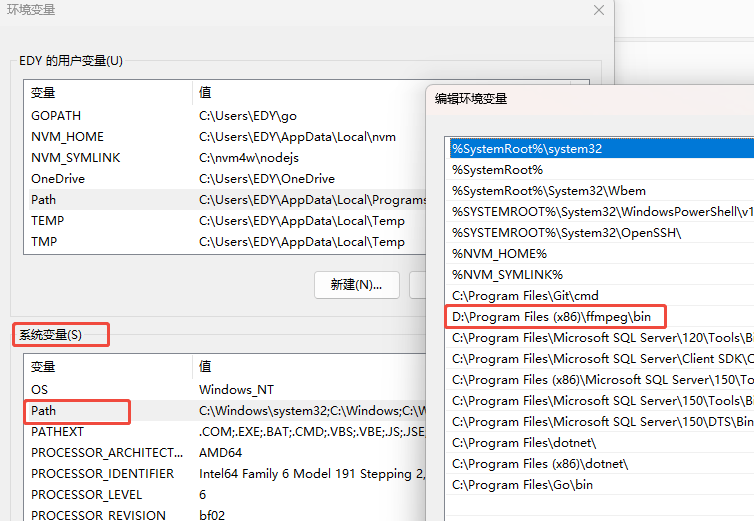
在命令行中运行 ffmpeg -version,确认 ffmpeg 是否安装成功。
1.2 mediamtx安装
步骤
- 访问 MediaMTX GitHub页面。
- 下载 Windows 版本的 MediaMTX。
二、配置 MediaMTX 和 FFmpeg 推流
1. 配置 MediaMTX
首先,需要编辑或使用默认的 MediaMTX 配置文件,来设置推流服务的参数。
步骤:
打开 MediaMTX 文件夹,找到 mediamtx.yml 配置文件。
修改 mediamtx.yml 配置文件,根据自己的需求进行设置。
常见的配置项包括:
- rtsp: 配置 RTSP 推流端口。
- rtmp: 配置 RTMP 推流端口。
- webrtc: 配置 WebRTC 推流设置。
yml
###############################################
# Global settings -> RTMP server

# Enable publishing and reading streams with the RTMP protocol.
rtmp: true
# Use the secure protocol variant (RTMP).
# Available values are "no", "strict", "optional".
rtmpEncryption: "no"
# Address of the RTMP listener. This is needed only when encryption is "no" or "optional".
rtmpAddress: :1935
# Address of the RTMPS listener. This is needed only when encryption is "strict" or "optional".
rtmpsAddress: :1936
# Path to the server key. This is needed only when encryption is "strict" or "optional".
# This can be generated with:
# openssl genrsa -out server.key 2048
# openssl req -new -x509 -sha256 -key server.key -out server.crt -days 3650
rtmpServerKey: server.key
# Path to the server certificate. This is needed only when encryption is "strict" or "optional".
rtmpServerCert: server.crt

###############################################- 配置好后双击exe文件启动mediamtx
2. FFmpeg 推流到 MediaMTX
步骤
- 打开命令行或终端。
- 运行以下命令,将本地视频文件推流到 MediaMTX:
bash
ffmpeg -re -stream_loop -1 -i test_audio.mp4 -c copy -f rtsp rtsp://127.0.0.1:8554/live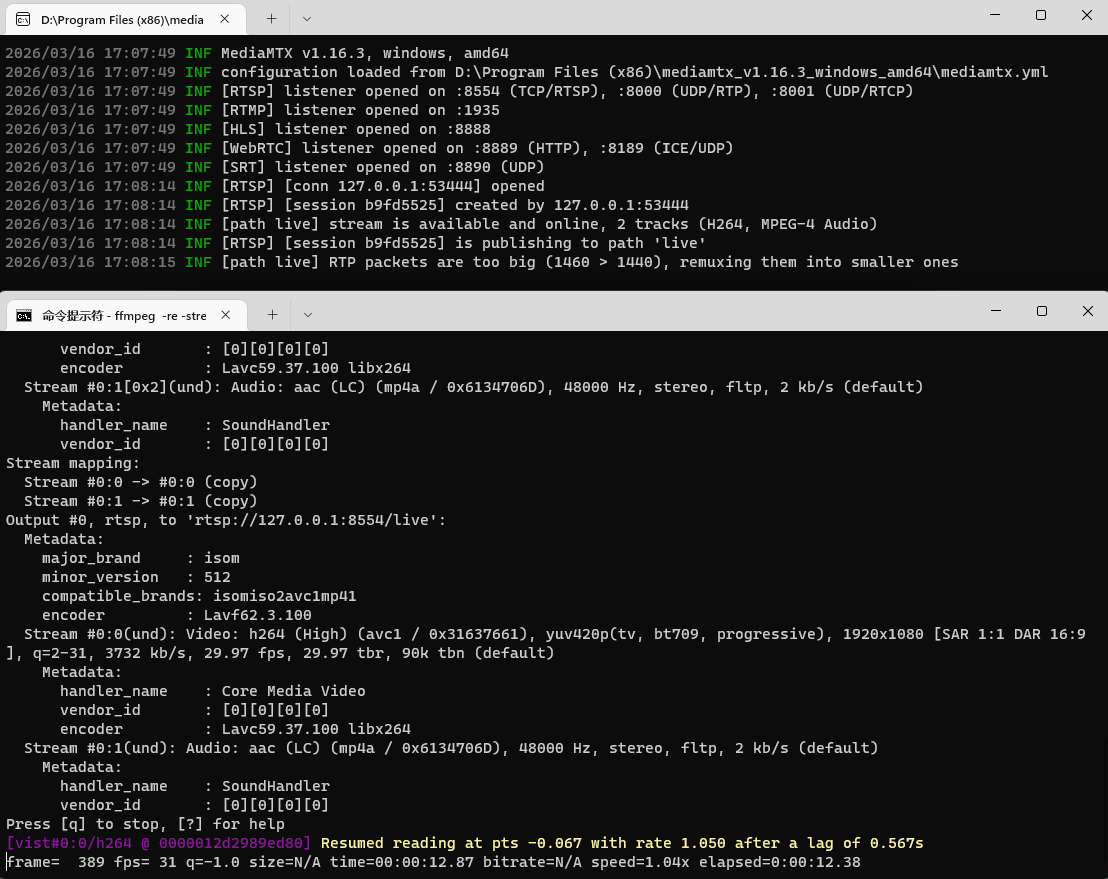
- 最后使用 VLC 播放器 ,加载 rtsp://127.0.0.1:8554/live 即可播放
三、注意事项
1 rtsp流没有音频信息
bash
#查看 test.mp4 的视频详细信息
ffprobe test.mp4

# 为 test.mp4 添加一个持续10秒的48000Hz立体声静音AAC音频流,生成新文件 test_audio.mp4
ffmpeg -f lavfi -i anullsrc=channel_layout=stereo:sample_rate=48000 -i test.mp4 -c:v copy -c:a aac -shortest test_audio.mp4